Public datasets fuel the machine learning research rocket (h/t Andrew Ng), but it’s still too difficult to simply get those datasets into your machine learning pipeline. Every researcher goes through the pain of writing one-off scripts to download and prepare every dataset they work with, which all have different source formats and complexities. Not anymore.
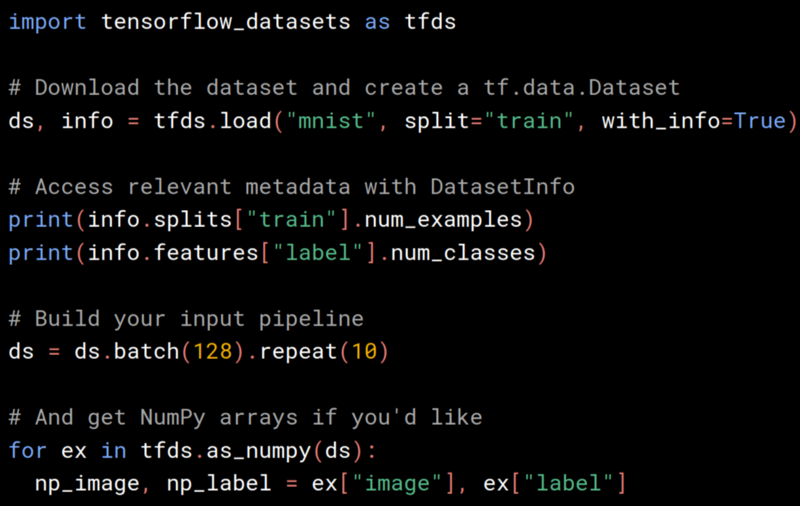
Google released TensorFlow Datasets (GitHub) which exposes public research datasets as tf.data.Datasets and as NumPy arrays. It does all the grungy work of fetching the source data and preparing it into a common format on disk, and it uses the tf.data API to build high-performance input pipelines, which are TensorFlow 2.0-ready and can be used with tf.keras models. They’re launching with 29 popular research datasets such as MNIST, Street View House Numbers, the 1 Billion Word Language Model Benchmark, and the Large Movie Reviews Dataset, and will add more in the months to come; even you can join in and add a dataset yourself.
tl;dr
# Install: pip install tensorflow-datasets
import tensorflow_datasets as tfds
mnist_data = tfds.load("mnist")
mnist_train, mnist_test = mnist_data["train"], mnist_data["test"]
assert isinstance(mnist_train, tf.data.Dataset)
Try tfds out in a Colab notebook.
tfds.load and DatasetBuilder
Every dataset is exposed as a DatasetBuilder, which knows:
- Where to download the data from and how to extract it and write it to a standard format (
DatasetBuilder.download_and_prepare). - How to load it from disk (
DatasetBuilder.as_dataset). - And all the information about the dataset, like the names, types, and shapes of all the features, the number of records in each split, the source URLs, citation for the dataset or associated paper, etc. (
DatasetBuilder.info).
You can directly instantiate any of the DatasetBuilders or fetch them by string with tfds.builder:
import tensorflow_datasets as tfds

# Fetch the dataset directly
mnist = tfds.image.MNIST()
# or by string name
mnist = tfds.builder('mnist')

# Describe the dataset with DatasetInfo
assert mnist.info.features['image'].shape == (28, 28, 1)
assert mnist.info.features['label'].num_classes == 10
assert mnist.info.splits['train'].num_examples == 60000

# Download the data, prepare it, and write it to disk
mnist.download_and_prepare()

# Load data from disk as tf.data.Datasets
datasets = mnist.as_dataset()
train_dataset, test_dataset = datasets['train'], datasets['test']
assert isinstance(train_dataset, tf.data.Dataset)

# And convert the Dataset to NumPy arrays if you'd like
for example in tfds.as_numpy(train_dataset):
  image, label = example['image'], example['label']
  assert isinstance(image, np.array)
as_dataset() accepts a batch_size argument which will give you batches of examples instead of one example at a time. For small datasets that fit in memory, you can pass batch_size=-1 to get the entire dataset at once as a tf.Tensor. All tf.data.Datasets can easily be converted to iterables of NumPy arrays using tfds.as_numpy().
As a convenience, you can do all the above with tfds.load, which fetches the DatasetBuilder by name, calls download_and_prepare(), and calls as_dataset().
import tensorflow_datasets as tfds

datasets = tfds.load("mnist")
train_dataset, test_dataset = datasets["train"], datasets["test"]
assert isinstance(train_dataset, tf.data.Dataset)
You can also easily get the DatasetInfo object from tfds.load by passing with_info=True. See the API documentation for all the options.
Dataset Versioning
Every dataset is versioned (builder.info.version) so that you can rest assured that the data doesn’t change underneath you and that results are reproducible. For now, tensorflow guarantee that if the data changes, the version will be incremented.
Note that while they do guarantee the data values and splits are identical given the same version, they do not currently guarantee the ordering of records for the same version.
Dataset Configuration
Datasets with different variants are configured with named BuilderConfigs. For example, the Large Movie Review Dataset (tfds.text.IMDBReviews) could have different encodings for the input text (for example, plain text, or a character encoding, or a subword encoding). The built-in configurations are listed with the dataset documentation and can be addressed by string, or you can pass in your own configuration.
# See the built-in configs
configs = tfds.text.IMDBReviews.builder_configs
assert "bytes" in configs

# Address a built-in config with tfds.builder
imdb = tfds.builder("imdb_reviews/bytes")
# or when constructing the builder directly
imdb = tfds.text.IMDBReviews(config="bytes")
# or use your own custom configuration
my_encoder = tfds.features.text.ByteTextEncoder(additional_tokens=['hello'])
my_config = tfds.text.IMDBReviewsConfig(
    name="my_config",
    version="1.0.0",
    text_encoder_config=tfds.features.text.TextEncoderConfig(encoder=my_encoder),
)
imdb = tfds.text.IMDBReviews(config=my_config)
See the section on dataset configuration in their documentation on adding a dataset.
Text Datasets and Vocabularies
Text datasets can be often be painful to work with because of different encodings and vocabulary files. tensorflow-datasets makes it much easier. It’s shipping with many text tasks and includes three kinds of TextEncoders, all of which support Unicode:
ByteTextEncoderfor byte/character-level encodingsTokenTextEncoderfor word-level encodings based on a vocabulary fileSubwordTextEncoderfor subword-level encodings (and the ability to construct the subword vocabulary tuned to a particular text corpus) with a byte-level fallback so that it’s fully invertible. For example, “hello world” could get split into [“he”, “llo”, “ “, “wor”, “ld”] and then integer-encoded. Subwords are a happy medium between word-level and byte-level encodings and are popular in some natural language research projects.
The encoders, along with their vocabulary sizes, can be accessed through DatasetInfo:
imdb = tfds.builder("imdb_reviews/subwords8k")

# Get the TextEncoder from DatasetInfo
encoder = imdb.info.features["text"].encoder
assert isinstance(encoder, tfds.features.text.SubwordTextEncoder)

# Encode, decode
ids = encoder.encode("Hello world")
assert encoder.decode(ids) == "Hello world"

# Get the vocabulary size
vocab_size = encoder.vocab_size
Both TensorFlow and TensorFlow Datasets are working to improve text support even further in the future.
Getting started
Their documentation site is the best place to start using tensorflow-datasets. Here are some additional pointers for getting started:
They expect to add datasets in the coming months, and hope that the community will join in. Open a GitHub Issue to request a dataset, vote on which datasets should be added next, discuss implementation, or ask for help. And Pull Requests very welcome! Add a popular dataset to contribute to the community, or if you have your own data, contribute it to TFDS to make your data famous!
Now that data is easy, happy modeling!
 anyonecancode